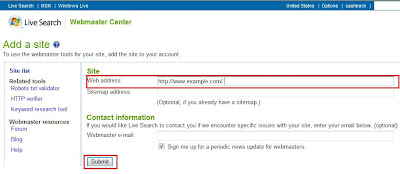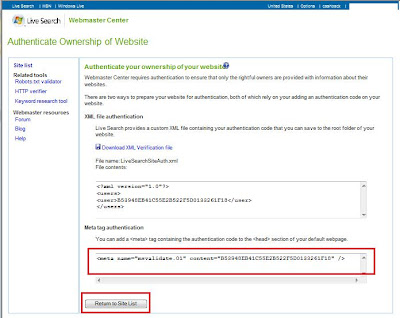








A sitemap is certainly a good way to let the search engines know about the pages deeper in your blog sometimes it takes a while for MSN and Yahoo to index all of your pages, they pay more attention to pages that have proven to be popular as judged by the number and quality of the links pointing to the site. Since newer sites tend not to have many links yet, the engines crawls them less frequently, and one more thing you must verify your web site and this might be the first thing to search if Google, Yahoo and MSN are not crawling your web site.
Submit your sitemap to Google:
1. Sign into Google Webmaster Tools with your Google Account.
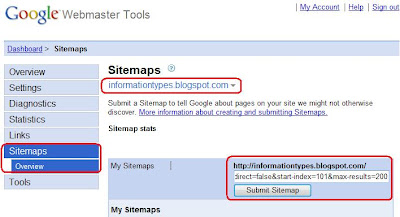
2. Click Sitemaps on the Dashboard make sure your blog is already listed and verified with Google. If not you must do it now before proceed to the next step. (Authenticate your website with Google, Yahoo and MSN)
3. In the text box, type either atom.xml or rss.xml. For example, if you add the Atom feed as a Sitemap, the full URL will be "http://yourblog.blogspot.com/atom.xml"
2. Click Sitemaps on the Dashboard make sure your blog is already listed and verified with Google. If not you must do it now before proceed to the next step. (Authenticate your website with Google, Yahoo and MSN)
3. In the text box, type either atom.xml or rss.xml. For example, if you add the Atom feed as a Sitemap, the full URL will be "http://yourblog.blogspot.com/atom.xml"

4. Click Submit Sitemap.
Note : Blogger uses an RSS-feed as a Sitemap and this done automatically for you, which is limited to the most recent posts. By default, atom.xml / rss.xml only contain 26 posts. If you want to increase the number of posts in your atom.xml, change your URL to:
atom.xml?redirect=false&start-index=1&max-results=100
This will give you 100 posts.
This will give you 100 posts.
If you have more than 100 posts, simply add another URL to get the next batch:
atom.xml?redirect=false&start-index=101&max-results=200 (201-300, 301-400 and so on...)
atom.xml?redirect=false&start-index=101&max-results=200 (201-300, 301-400 and so on...)

Submit your sitemap to Yahoo:
1. Sign into Yahoo Site Explorer with your Yahoo Account.
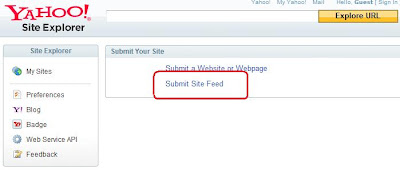
2. From the Site Explorer click Submit Site Feed.
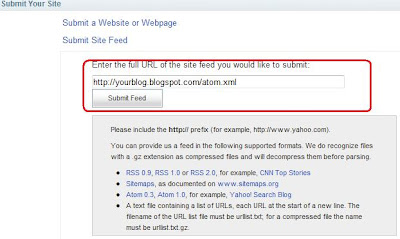
3. In the text box, type the full URL of your feed either atom.xml or rss.xml. For example, if you add the Atom feed as a Sitemap, the full URL will be http://yourblog.blogspot.com/atom.xml.
4. Click Submit Feed.
Submit your sitemap to MSN:
1. Sign into Windows Live with your Windows Live ID (Hotmail ID)
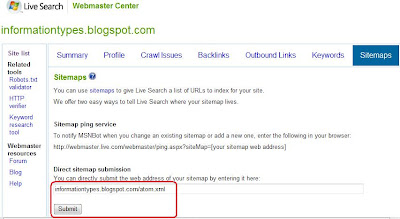
2. On the Webmaster Center, in the text box, type the full URL of your feed either atom.xml or rss.xml. For example, if you add the Atom feed as a Sitemap, the full URL will be http://yourblog.blogspot.com/atom.xml.
3. Click Submit
1. Sign into Windows Live with your Windows Live ID (Hotmail ID)
2. On the Webmaster Center, in the text box, type the full URL of your feed either atom.xml or rss.xml. For example, if you add the Atom feed as a Sitemap, the full URL will be http://yourblog.blogspot.com/atom.xml.
3. Click Submit